1
Run Installer
You can install it by running the exe file.
Have you ever faced the issue of compressed audio on your system? Or is the audio good when you are using one app and dulls in another? If so, then you might have tried to fine-tune your system audio. But find no desirable results.
That’s where the Equalizer APO tool comes in. This innovative tool is designed for Windows. You can use it to take complete control of your audio output. Basically, it works on the system level to improve, adjust, and personalize the audio quality.
Gamers, professional editors and even music lovers are using this audio processing object to transform the audio quality. Moreover, this lightweight software is easy to install on Windows.

It is a free, open-source audio processing tool for Microsoft Windows. This graphical Equalizer was developed by Jonas Thedering, which allows you to enhance your system audio. There are many Equalizers on the internet, but they work on specific apps.
On the other hand, it works at the system level and improves the sound quality. That means, no matter if you are playing a game or listening to music, your system will provide you with the best audio quality.
This tool uses the Audio Processing Object (APO) framework built into Windows. So, you can apply filters and adjustments with low latency. Additionally, it is often used with the Peace GUI, which is a user-friendly interface. They both make adjusting audio profiles easier.

Here are some amazing features of the audio Equalizer tool for PC. You must explore them all:
This open-source software is designed to run efficiently on all systems. Therefore, you can easily edit all audio without slowing down your PC.
Equalizer software supports multiple channels, including stereo, 5.1, and 7.1. With these multiple-channel setups, you can set consistent and high-quality sounds across all devices. This feature is useful for gaming, music, and movies.
For better settings, you can also integrate it with Voicemeeter. Additionally, it is also used in combination with the Room EQ wizard system to get maximum performance.
So, you will have better virtual audio mixing and provide better control over your system’s sound.
The developer has set the interface of Equalizer APO to be flexible. So that everyone can use it without any issues. You can choose between text-based configurations or the Peace GUI for audio settings.
With this flexibility, both beginners and professionals can create, save, and manage audio profiles.
It offers both parametric and graphic Equalizers. You can easily adjust frequencies and precision with these tools. By using these tools, you can adjust all sound effects, including bass and treble.
On the Equalizer audio processing tool, you can create sordid audio profiles for different playback devices. Like, you can set headphones or external speakers profiles to enjoy tailored audio on each device.
Here is a download links for you. You can download it easily on your devices just by clicking on it. While downloading, you should not worry about security, as we have tested it on various Windows and passed it through an error-detector to provide you with a safe link.
Download 32-bit Download ARM64 Download srcFollow these steps to install and start using on your system.
You can install it by running the exe file.
You will see a configurator during the installation, indicating which devices you should install the APO on. It is also possible to reopen this dialog by running the Configurator file from the installation directory again.
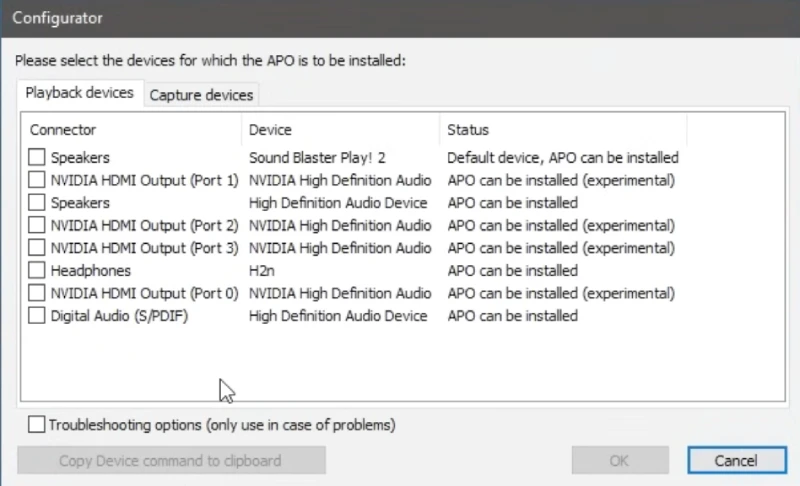
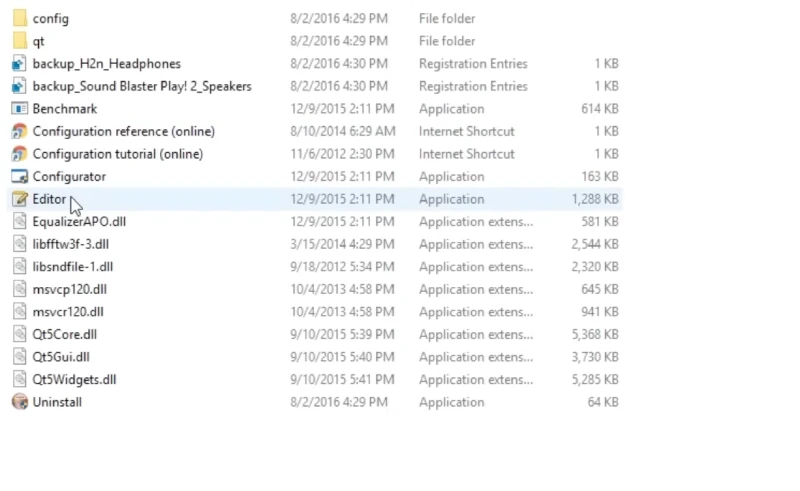
It will now ask you to reboot. Therefore, restart your computer. Navigate to the installation files and open the file Editor to run the software.
In order to apply the equalizer, you must first create a config file by clicking + > Include. Open the text file and give it a name.

Again, go to Control > Device and select the device for which the configuration file should be applied.
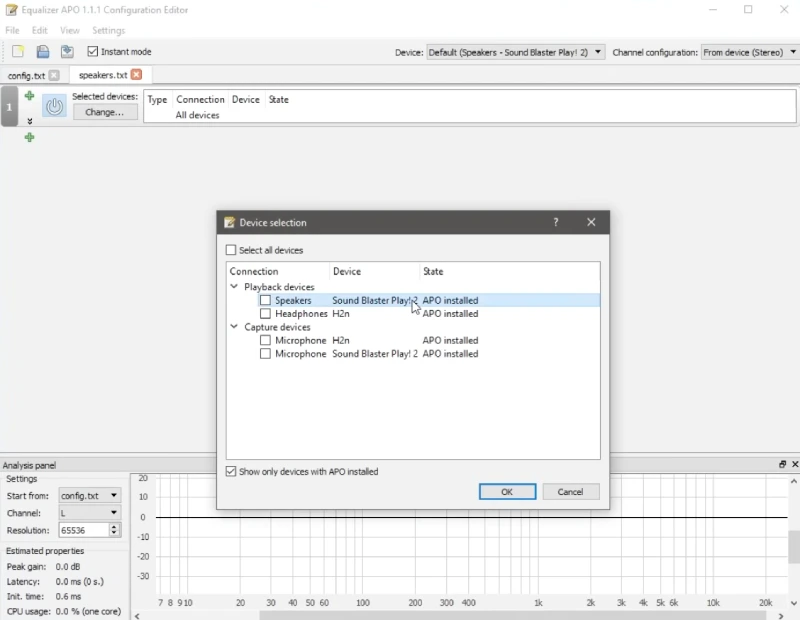
You can now apply equalizer to the selected device. All settings, such as Basic filters, Graphic equalizers, and Advanced filters, can now be applied.
Here are the system requirements to install and use the APO app on Windows. You should examine these requirements before installing this software.
| Requirement | Details |
|---|---|
| Operating System | Windows Vista or later (Windows 7–11 tested) |
| CPU Architecture | x64 (64-bit), x86 (32-bit), or ARM64 (Windows 10/11) |
| RAM | Minimum 512 MB |
| Disk Space | At least 5 MB free |
| Audio Device | Any sound card compatible with Windows |
| Audio Compatibility | Applications must use system effect infrastructure (ASIO or WASAPI exclusive mode not supported) |
| Administrator Access | Required for installation |
If you are tired of listening to your computer's low-quality audio, then you can easily optimize it. For the audio optimization, you need Equalizer APO software.
It contains all the unique features that can enhance your experience. So, you must download it and create a custom audio profile for each device for better results.